
Here's Why I Actually Like the Steam Machine
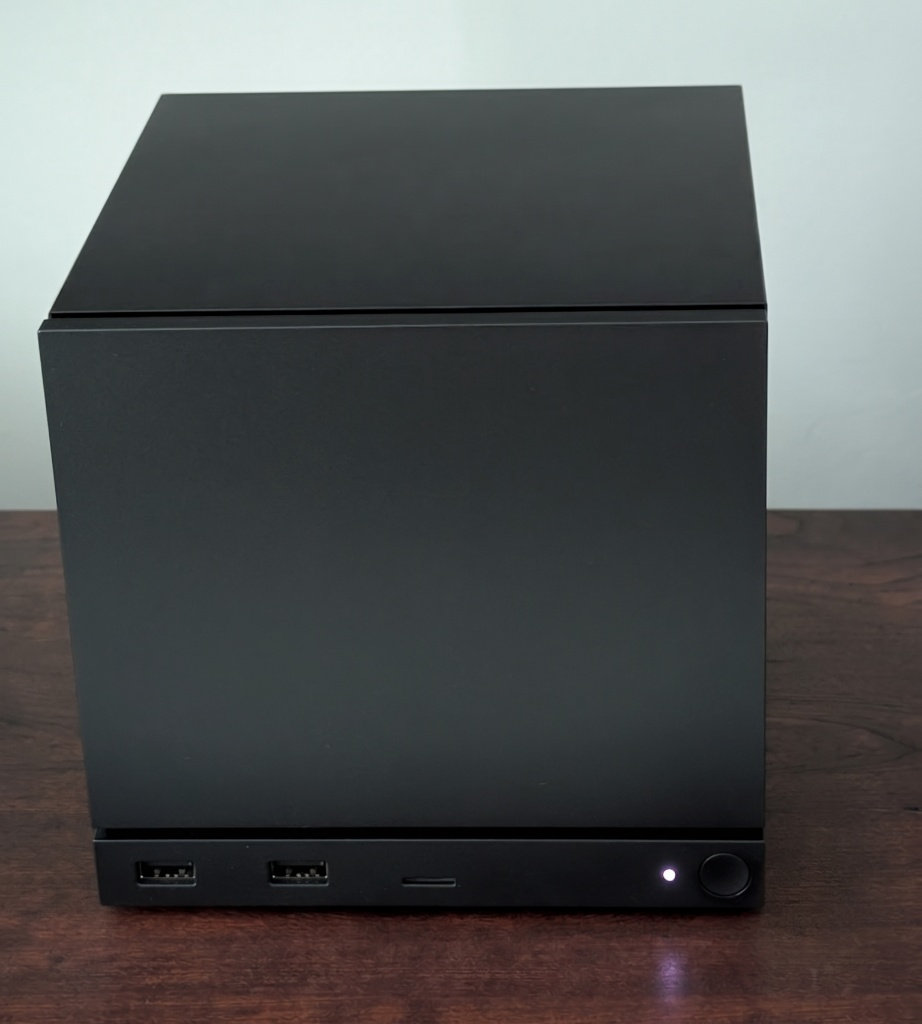
When Valve first announced the Steam Machine, I was excited about it. I believed it would come in somewhere around $750, which seemed reasonable for a small SteamOS box for the living room, and I figured I'd buy one on day one. Then the actual pricing came out and it was considerably higher than that. It's a lot of money for the specs, and the early reviews backed that up. Most reviewers pointed out that you can put together or buy a faster machine for the same money. They're technically not wrong.
In fairness to Valve, hardware prices have gone up across the board. The AI buildout has created a serious shortage of memory, and DDR5 and NAND pricing has dragged the cost of everything else along with it. Building a comparable machine today costs a lot more than it would have a year or two ago.
What kept bringing me back was the size and hassle-free experience. I've wanted a small form factor PC for the living room for a long time, and there isn't much out there this compact. Plenty of mini PCs exist, but once you want a usable GPU they get considerably bigger, or they ship with a laptop-style power brick where the Steam Machine just takes a regular power cable, or they're barebones kits where I'd be sourcing the rest myself. The Steam Machine is roughly a six inch cube, right around the size of a GameCube, hence the GabeCube nickname. It sits on my entertainment stand without looking out of place, which is more than I can say for almost any other PC hardware on the market.
I'd also been using my old LCD Steam Deck as a makeshift Steam Machine for a while, sitting in the official Steam Deck Dock and hooked up to the TV, so I already knew I liked playing this way. The other thing pushing me toward the bundle was that I wasn't able to reserve a Steam Controller when it was first announced, and buying the machine with one included was the easiest way to finally get my hands on it.
So I reserved one, and when I got the email prompting me to purchase in the very first batch of Steam Machines, I decided to pull the trigger. I went with the 512 GB model and the new Steam Controller, which came to $1,128.00 plus sales tax, and it arrived on July 3rd. I have both the original Steam Deck and the OLED revision, so SteamOS wasn't new to me.
Setting it up was ridiculously easy. Plug in power and HDMI, sign in, and it's ready to go. It feels premium too, more like a console than a cheap mini PC.
Building One Would Have Been More Work Than I Wanted
My first instinct was to build something instead, since I've built a lot of PCs over the years. On paper that's the better move. Pick the parts, wait for sales, end up with something faster and the ability to upgrade whatever I want later.
The problem was everything after the parts list. I'd need a case small enough that it doesn't look silly next to the TV, then sort out cooling inside an enclosure that size, install and configure the OS, and get controller pairing working well. Whatever I came up with would have been bigger and louder, and it wouldn't have been as pleasant to sit down and use.
HDMI CEC is a huge plus and was a major deciding factor for me. CEC stands for Consumer Electronics Control, and it's the part of the HDMI spec that lets connected devices send each other basic commands. What that means in practice is that I press the Steam button on the controller and the machine, the TV, and my receiver all come on together from a fully powered off state, with the inputs switched over automatically. I never pick up a remote. Consoles have done this for years, but support on desktop PCs is spotty (if not completely non-existent), and on my own build I'd be adding an aftermarket adapter and writing scripts to get part of the way there. Valve shipped it working, and it's one of my favorite things about the machine.
SteamOS Is Doing the Heavy Lifting
I've been using Linux for over 20 years, and Valve's work on Proton has done more for Linux gaming than anything else I can point to. Installing a Windows game and hitting Play mostly works now. Most competitive titles with kernel-level anti-cheat are still off the table, but that's a much shorter list than it was a decade ago.
On a television, SteamOS shines. The interface is polished and I can drive all of it with the controller, so there's no keyboard on the coffee table for the times something needs adjusting. Desktop mode is still there when I want an actual Linux machine.
I run Bazzite on both of my Steam Decks, so I've been going back and forth on installing it here as well. I'm leaving it stock for now, since SteamOS is already doing everything I want on this machine.
Better Than Docking My Deck
Docking the Deck works, but it always felt like docking a handheld, because that's what it is. The Deck has to be in the room, it goes in the dock, and I still need to get a controller connected to it. The Steam Machine is better in this regard, as it is permanently situated in the living room and the Steam Controller is already paired to the machine, which has a wireless adapter for it built in, so I sit down and start playing.
Performance and Upgrades
The 1080p performance is solid, and it stays quiet while gaming. It doesn't thermal throttle either, so it holds up over a long session.
The microSD slot carries over from the Deck, so you can pull a card out of the Deck and pop it in rather than downloading your games all over again. 512 GB doesn't go far, though. I'm waiting for a 4 TB NVMe to go on sale before I swap the drive, and I'll possibly add a second 16 GB DDR5 module if memory prices ever get reasonable again as dual-channel has considerable performance advantages. Both are ordinary parts I can install myself fairly easily.
Bottom Line
If you value convenience, you want hardware that looks right in a living room, and you're already living in the Steam ecosystem, the Steam Machine is a great fit. If you're shopping on a budget, or you'd rather build and tweak your own hardware, it isn't the machine for you. I'm firmly in the first group, and I'd buy it again.